
참고로 전 엔드필드 해본적이없습니다.
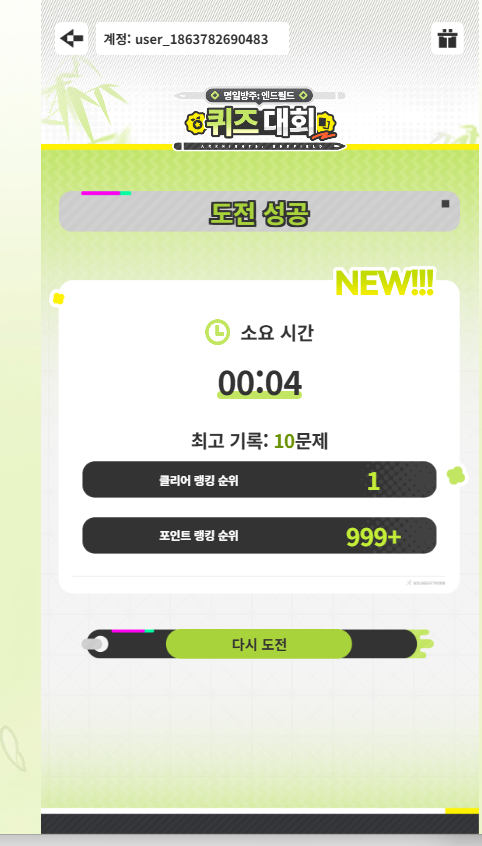
똥 코딩 하지 마세요
사용된 코드
```
<!DOCTYPE html>
<html lang="ko">
<head>
<meta charset="UTF-8" />
<meta name="viewport" content="width=device-width, initial-scale=1.0" />
<title>엔드필드 퀴즈 자동 풀이기</title>
<style>
@import url('https://fonts.googleapis.com/css2?family=Noto+Sans+KR:wght@400;700;900&display=swap');
:root {
--bg: #0d0f14;
--surface: #161921;
--surface2: #1e2230;
--border: #2a2f3e;
--accent: #c2e661;
--accent2: #7bb8f8;
--text: #e8eaf0;
--text-muted: #7a8099;
--success: #4ade80;
--warn: #facc15;
--danger: #f87171;
}
* { box-sizing: border-box; margin: 0; padding: 0; }
body {
background: var(--bg);
color: var(--text);
font-family: 'Noto Sans KR', sans-serif;
min-height: 100vh;
display: flex;
flex-direction: column;
align-items: center;
padding: 32px 16px;
}
/* ── HERO ── */
.hero { text-align: center; margin-bottom: 36px; }
.hero .badge {
display: inline-block;
background: linear-gradient(90deg, #c2e661, #7bb8f8);
-webkit-background-clip: text;
-webkit-text-fill-color: transparent;
font-size: 11px;
font-weight: 700;
letter-spacing: 3px;
text-transform: uppercase;
margin-bottom: 12px;
}
.hero h1 {
font-size: 34px;
font-weight: 900;
line-height: 1.2;
margin-bottom: 12px;
}
.hero h1 span { color: var(--accent); }
.hero p {
color: var(--text-muted);
font-size: 14px;
max-width: 520px;
margin: 0 auto;
line-height: 1.7;
}
/* ── CARD ── */
.card {
background: var(--surface);
border: 1px solid var(--border);
border-radius: 16px;
padding: 28px;
width: 100%;
max-width: 680px;
margin-bottom: 20px;
}
.card-title {
font-size: 11px;
font-weight: 700;
color: var(--text-muted);
letter-spacing: 2px;
text-transform: uppercase;
margin-bottom: 18px;
display: flex;
align-items: center;
gap: 8px;
}
.card-title::before {
content: '';
display: inline-block;
width: 3px;
height: 14px;
background: var(--accent);
border-radius: 2px;
}
/* ── STEPS ── */
.steps { display: flex; flex-direction: column; gap: 16px; }
.step { display: flex; gap: 14px; align-items: flex-start; }
.step-num {
width: 30px;
height: 30px;
border-radius: 50%;
background: transparent;
border: 2px solid var(--accent);
color: var(--accent);
font-size: 13px;
font-weight: 700;
display: flex;
align-items: center;
justify-content: center;
flex-shrink: 0;
}
.step-content {
padding-top: 4px;
font-size: 14px;
line-height: 1.8;
color: var(--text);
}
.step-content strong { color: var(--accent2); }
.step-content code {
background: var(--surface2);
color: var(--accent);
font-size: 12px;
padding: 1px 6px;
border-radius: 4px;
font-family: 'Courier New', monospace;
}
/* ── BOOKMARKLET ── */
.bookmarklet-wrapper {
display: flex;
flex-direction: column;
align-items: center;
gap: 16px;
}
.bookmarklet-btn {
display: inline-flex;
align-items: center;
gap: 10px;
background: linear-gradient(135deg, #c2e661, #9fd448);
color: #131a00;
font-family: 'Noto Sans KR', sans-serif;
font-weight: 900;
font-size: 15px;
padding: 15px 32px;
border-radius: 12px;
text-decoration: none;
border: none;
cursor: grab;
transition: transform 0.15s, box-shadow 0.15s;
box-shadow: 0 4px 28px rgba(194, 230, 97, 0.32);
user-select: none;
}
.bookmarklet-btn:hover {
transform: translateY(-3px);
box-shadow: 0 10px 36px rgba(194, 230, 97, 0.5);
}
.bookmarklet-btn:active { transform: translateY(0); cursor: grabbing; }
.bookmarklet-hint {
color: var(--text-muted);
font-size: 12px;
text-align: center;
line-height: 1.6;
}
/* ── CODE BLOCK ── */
.code-wrapper { position: relative; }
.code-block {
background: #08090d;
border: 1px solid var(--border);
border-radius: 10px;
padding: 16px;
font-family: 'Courier New', monospace;
font-size: 11.5px;
color: #b6e05a;
line-height: 1.75;
white-space: pre;
overflow: auto;
max-height: 340px;
cursor: text;
}
.code-block::-webkit-scrollbar { width: 5px; height: 5px; }
.code-block::-webkit-scrollbar-thumb { background: var(--border); border-radius: 3px; }
.copy-btn {
position: absolute;
top: 10px;
right: 10px;
background: var(--surface2);
border: 1px solid var(--border);
color: var(--text);
font-size: 11px;
padding: 5px 12px;
border-radius: 6px;
cursor: pointer;
font-family: 'Noto Sans KR', sans-serif;
transition: background 0.15s;
}
.copy-btn:hover { background: var(--border); }
/* ── INFO / WARN ── */
.info-box, .warn-box, .success-box {
border-radius: 10px;
padding: 14px 16px;
font-size: 13px;
line-height: 1.75;
display: flex;
gap: 10px;
}
.info-box {
background: rgba(123, 184, 248, 0.07);
border: 1px solid rgba(123, 184, 248, 0.25);
color: var(--accent2);
}
.warn-box {
background: rgba(250, 204, 21, 0.07);
border: 1px solid rgba(250, 204, 21, 0.25);
color: var(--warn);
}
.success-box {
background: rgba(74, 222, 128, 0.07);
border: 1px solid rgba(74, 222, 128, 0.25);
color: var(--success);
}
.box-icon { flex-shrink: 0; margin-top: 1px; }
/* ── TABS ── */
.tabs { display: flex; gap: 4px; margin-bottom: 18px; }
.tab-btn {
padding: 6px 16px;
border-radius: 8px;
font-size: 12px;
font-weight: 700;
cursor: pointer;
border: 1px solid var(--border);
background: transparent;
color: var(--text-muted);
transition: all 0.15s;
font-family: 'Noto Sans KR', sans-serif;
}
.tab-btn.active {
background: var(--accent);
color: #131a00;
border-color: var(--accent);
}
.tab-panel { display: none; }
.tab-panel.active { display: block; }
footer {
margin-top: 40px;
color: var(--text-muted);
font-size: 12px;
text-align: center;
}
</style>
</head>
<body>
<!-- ════════ HERO ════════ -->
<div class="hero">
<div class="badge">🔬 리버싱 기반 자동화 · Chimera Store 분석</div>
<h1>엔드필드 퀴즈<br/><span>자동 풀이기</span></h1>
<p>
명일방주: 엔드필드 트리비아 챌린지 이벤트의 퀴즈를 자동으로 정답 클릭해주는 프로그램입니다.<br/>
<code style="color:var(--accent)">window.__CHIMERA_STORE__</code> 상태를 실시간 모니터링하여 정답을 식별합니다.
</p>
</div>
<!-- ════════ HOW TO ════════ -->
<div class="card">
<div class="card-title">사용 방법</div>
<div class="steps">
<div class="step">
<div class="step-num">1</div>
<div class="step-content">
아래 <strong>「⚡ 퀴즈 자동풀이」</strong> 버튼을 <strong>북마크 바로 드래그</strong>해서 저장하세요.<br/>
(북마크 바가 안 보이면 Ctrl+Shift+B로 활성화)
</div>
</div>
<div class="step">
<div class="step-num">2</div>
<div class="step-content">
이벤트 페이지로 이동: <code>act.skport.com/endfield/trivia-challenge</code>
</div>
</div>
<div class="step">
<div class="step-num">3</div>
<div class="step-content">
로그인 후 <strong>「도전하기」</strong> 버튼으로 퀴즈를 시작하세요.
</div>
</div>
<div class="step">
<div class="step-num">4</div>
<div class="step-content">
퀴즈 화면이 열리면 저장해둔 <strong>북마클릿</strong>을 클릭하세요. 자동으로 정답을 찾아 클릭합니다.
</div>
</div>
<div class="step">
<div class="step-num">5</div>
<div class="step-content">
또는 <strong>F12 → Console 탭</strong>에서 아래 콘솔 코드를 직접 붙여넣어 실행해도 됩니다.
</div>
</div>
</div>
</div>
<!-- ════════ BOOKMARKLET ════════ -->
<div class="card">
<div class="card-title">북마클릿 (드래그해서 북마크 바에 저장)</div>
<div class="bookmarklet-wrapper">
<a class="bookmarklet-btn" id="bookmarkletLink" href="#" title="북마크 바로 드래그하세요">
<svg width="20" height="20" viewBox="0 0 24 24" fill="none" stroke="currentColor" stroke-width="2.5">
<polygon points="13 2 3 14 12 14 11 22 21 10 12 10 13 2"/>
</svg>
⚡ 퀴즈 자동풀이
</a>
<div class="bookmarklet-hint">
↑ 이 버튼을 <strong style="color:var(--accent)">북마크 바로 드래그</strong>하거나, 퀴즈 시작 후 클릭하세요.<br/>
멈추려면 콘솔에서 <code style="color:var(--accent);font-size:11px">_stopSolver()</code> 실행
</div>
</div>
</div>
<!-- ════════ CODE TABS ════════ -->
<div class="card">
<div class="card-title">코드 보기</div>
<div class="tabs">
<button class="tab-btn active" onclick="switchTab('full')">전체 코드</button>
<button class="tab-btn" onclick="switchTab('mini')">최소화 코드</button>
</div>
<div class="tab-panel active" id="tab-full">
<div class="code-wrapper">
<div class="code-block" id="fullCode"></div>
<button class="copy-btn" onclick="copyCode('full')">복사</button>
</div>
</div>
<div class="tab-panel" id="tab-mini">
<div class="code-wrapper">
<div class="code-block" id="miniCode" style="font-size:10px;"></div>
<button class="copy-btn" onclick="copyCode('mini')">복사</button>
</div>
</div>
</div>
<!-- ════════ INFO BOXES ════════ -->
<div class="card">
<div class="card-title">작동 원리 (리버싱 분석)</div>
<div style="display:flex;flex-direction:column;gap:12px;">
<div class="success-box">
<svg class="box-icon" width="18" height="18" viewBox="0 0 24 24" fill="none" stroke="currentColor" stroke-width="2.5">
<polyline points="20 6 9 17 4 12"/>
</svg>
<div>
<strong>Chimera Store 실시간 모니터링</strong><br/>
<code style="color:var(--success);font-size:11px">window.__CHIMERA_STORE__.dataMap["kKgqselBCkfAgJHX"]["253d287cf3c8933df8c4a5451b9e3897"].state</code>를 폴링하여 <code>isQuestioning</code>이 true가 되면 현재 문제 데이터를 추출합니다.
</div>
</div>
<div class="info-box">
<svg class="box-icon" width="18" height="18" viewBox="0 0 24 24" fill="none" stroke="currentColor" stroke-width="2.5">
<circle cx="12" cy="12" r="10"/><line x1="12" y1="8" x2="12" y2="12"/><line x1="12" y1="16" x2="12.01" y2="16"/>
</svg>
<div>
<strong>API 구조</strong><br/>
API: <code style="color:var(--accent2);font-size:11px">zonai.skport.com/api/v1/activity/endfield/active/v1d2/</code><br/>
흐름: <code style="color:var(--accent2);font-size:11px">start-question</code> → Store 상태에 문제 저장 → 정답 클릭 → <code style="color:var(--accent2);font-size:11px">end-question</code> 호출
</div>
</div>
<div class="info-box">
<svg class="box-icon" width="18" height="18" viewBox="0 0 24 24" fill="none" stroke="currentColor" stroke-width="2.5">
<path d="M22 11.08V12a10 10 0 1 1-5.93-9.14"/>
<polyline points="22 4 12 14.01 9 11.01"/>
</svg>
<div>
<strong>DOM 선택자 자동 탐지</strong><br/>
퀴즈 UI의 다중 CSS 선택자를 순차적으로 시도하며, React styled-components의 동적 클래스명에 대응합니다. <code>isQuestioning</code> 상태 변화 감지 시 자동으로 정답 클릭합니다.
</div>
</div>
<div class="warn-box">
<svg class="box-icon" width="18" height="18" viewBox="0 0 24 24" fill="none" stroke="currentColor" stroke-width="2.5">
<path d="M10.29 3.86L1.82 18a2 2 0 0 0 1.71 3h16.94a2 2 0 0 0 1.71-3L13.71 3.86a2 2 0 0 0-3.42 0z"/>
<line x1="12" y1="9" x2="12" y2="13"/><line x1="12" y1="17" x2="12.01" y2="17"/>
</svg>
<div>
<strong>주의</strong> — 기본 딜레이는 1.5초입니다. 너무 빠른 자동화는 어뷰징 감지될 수 있습니다. 이벤트 운영사의 서비스 약관을 준수하세요.
</div>
</div>
</div>
</div>
<footer>엔드필드 트리비아 챌린지 자동 풀이기 — 리버싱 분석 기반 (Chimera Store 방식)</footer>
<!-- ════════ SCRIPT ════════ -->
<script>
// ================================================================
// 자동 풀이 코드 (전체 주석 포함 버전)
// ================================================================
var FULL_CODE = `(function () {
'use strict';
// ─── 설정 ────────────────────────────────────────────────────
var CFG = {
clickDelayMs : 1500, // 정답 클릭 전 대기 시간 (ms)
pollMs : 600, // 상태 폴링 주기 (ms)
maxRounds : 30, // 최대 라운드 (무한루프 방지)
};
var roundsDone = 0;
var lastQ = '';
var timer = null;
log('🚀 엔드필드 퀴즈 자동풀이 시작');
log('💡 중단: window._stopSolver()');
// ─── 1. Chimera Store에서 현재 퀴즈 상태 읽기 ────────────────
function getQuizState() {
try {
var store = window.__CHIMERA_STORE__;
if (!store || !store.dataMap) return null;
// 1-a) 알려진 키로 직접 접근
var known1 = 'kKgqselBCkfAgJHX';
var known2 = '253d287cf3c8933df8c4a5451b9e3897';
if (store.dataMap[known1] && store.dataMap[known1][known2]) {
return store.dataMap[known1][known2].state;
}
// 1-b) 키를 모를 때 동적 탐색
var outerKeys = Object.keys(store.dataMap);
for (var i = 0; i < outerKeys.length; i++) {
var outer = store.dataMap[outerKeys[i]];
var innerKeys = Object.keys(outer);
for (var j = 0; j < innerKeys.length; j++) {
var s = outer[innerKeys[j]];
if (s && s.state && ('isQuestioning' in s.state)) {
return s.state;
}
}
}
} catch (e) {}
return null;
}
// ─── 2. React Fiber에서 현재 문제 + 정답 인덱스 추출 ─────────
function getFromFiber() {
try {
var el = document.querySelector('[class*="Quiz"], [class*="quiz"], [class*="Question"], [class*="question"]');
if (!el) return null;
var key = Object.keys(el).find(k => k.startsWith('__reactFiber') || k.startsWith('__reactInternalInstance'));
if (!key) return null;
var fiber = el[key];
while (fiber) {
var props = fiber.memoizedProps || {};
if (props.questionData) return props.questionData;
if (props.question) return props;
fiber = fiber.return;
}
} catch (e) {}
return null;
}
// ─── 3. DOM에서 선택지 버튼 목록 가져오기 ────────────────────
function getOptionButtons() {
var selectors = [
'[class*="OptionItem"]',
'[class*="optionItem"]',
'[class*="Option"][class*="Item"]',
'[class*="choice"]',
'[class*="Choice"]',
'[class*="answer"] li',
'[class*="Answer"] li',
'[class*="quiz"] li',
'[class*="Quiz"] li',
'[class*="question"] li',
'ul[class*="option"] li',
'ul[class*="answer"] li',
];
for (var i = 0; i < selectors.length; i++) {
var els = Array.prototype.slice.call(document.querySelectorAll(selectors[i]));
els = els.filter(function(el) {
var t = el.innerText ? el.innerText.trim() : '';
return t.length > 0 && t.length < 120;
});
if (els.length >= 2 && els.length <= 6) return els;
}
return [];
}
// ─── 4. 현재 질문 텍스트 가져오기 ───────────────────────────
function getQuestionText() {
var selectors = [
'[class*="QuestionText"]',
'[class*="questionText"]',
'[class*="QuestionContent"]',
'[class*="questionContent"]',
'[class*="QuestionTitle"]',
'[class*="question"] p',
'[class*="quiz"] h2',
'[class*="quiz"] h3',
'[class*="quiz"] p',
];
for (var i = 0; i < selectors.length; i++) {
var el = document.querySelector(selectors[i]);
if (el) {
var t = el.innerText.trim();
if (t.length > 4) return t;
}
}
// 폴백: 긴 텍스트 노드 탐색
var allText = Array.prototype.slice.call(
document.querySelectorAll('p, span, div, h1, h2, h3')
).filter(function(el) {
var t = el.innerText ? el.innerText.trim() : '';
return el.children.length === 0 && t.length > 10 && t.length < 200;
});
return allText.length ? allText[0].innerText.trim() : '';
}
// ─── 5. 정답 인덱스 결정 ─────────────────────────────────────
function getAnswerIndex(state) {
// Store에 correctOptionIndex, answerIndex, answer 등이 있으면 사용
if (!state) return null;
var candidate = [
'correctOptionIndex',
'answerIndex',
'correctIndex',
'answer',
'correctAnswer',
];
for (var i = 0; i < candidate.length; i++) {
var val = state[candidate[i]];
if (typeof val === 'number') return val;
}
// questionData 내부에 있을 수 있음
var qd = state.questionData || state.currentQuestion || {};
for (var i = 0; i < candidate.length; i++) {
var val = qd[candidate[i]];
if (typeof val === 'number') return val;
}
return null;
}
// ─── 6. 메인 풀이 루틴 ───────────────────────────────────────
function tryAnswer() {
if (roundsDone >= CFG.maxRounds) {
clearInterval(timer);
log('✅ 최대 라운드 완료!');
return;
}
var state = getQuizState();
// 퀴즈 진행 중인지 확인
if (!state || !state.isQuestioning) return;
var qText = getQuestionText();
if (!qText || qText === lastQ) return;
var ansIdx = getAnswerIndex(state);
var opts = getOptionButtons();
if (!opts || opts.length === 0) {
log('⚠ 선택지 DOM을 찾지 못했습니다. 재시도 중...');
return;
}
if (ansIdx === null) {
// Store에 인덱스가 없을 경우: 첫 번째 선택지를 클릭하며 경고
log('⚠ Store에서 정답 인덱스를 찾지 못함. 첫 번째 선택지 클릭 (디버그 필요)');
ansIdx = 0;
}
if (ansIdx >= opts.length) {
log('⚠ 인덱스(' + ansIdx + ')가 선택지 수(' + opts.length + ')를 초과함');
ansIdx = 0;
}
lastQ = qText;
roundsDone++;
var target = opts[ansIdx];
log('✅ [라운드 ' + roundsDone + '] 정답 클릭 예약:', target.innerText.trim());
log(' 질문:', qText.substring(0, 60));
setTimeout(function () {
target.click();
}, CFG.clickDelayMs);
}
// ─── Helper ──────────────────────────────────────────────────
function log() {
var args = Array.prototype.slice.call(arguments);
args.unshift('%c[퀴즈봇]', 'color:#c2e661;font-weight:700');
console.log.apply(console, args);
}
// ─── 실행 ────────────────────────────────────────────────────
timer = setInterval(tryAnswer, CFG.pollMs);
window._stopSolver = function () {
clearInterval(timer);
log('🛑 자동풀이 중지됨');
};
})();`;
// ================================================================
// 미니파이 (북마클릿용)
// ================================================================
function minify(code) {
return code
.replace(/\/\/[^\n]*/g, '') // 한줄 주석 제거
.replace(/\/\*[\s\S]*?\*\//g, '') // 블록 주석 제거
.replace(/\n\s*/g, ' ') // 개행·들여쓰기 제거
.replace(/\s{2,}/g, ' ') // 중복 공백
.trim();
}
var MINI_CODE = minify(FULL_CODE);
// ── DOM 주입 ──────────────────────────────────────────────────
document.getElementById('fullCode').textContent = FULL_CODE;
document.getElementById('miniCode').textContent = MINI_CODE;
// ── 북마클릿 링크 ─────────────────────────────────────────────
var bookmarkletHref = 'javascript:' + encodeURIComponent(MINI_CODE);
document.getElementById('bookmarkletLink').href = bookmarkletHref;
// ── 탭 전환 ──────────────────────────────────────────────────
function switchTab(name) {
document.querySelectorAll('.tab-btn').forEach(function(b) {
b.classList.toggle('active', b.getAttribute('onclick').includes("'" + name + "'"));
});
document.querySelectorAll('.tab-panel').forEach(function(p) {
p.classList.toggle('active', p.id === 'tab-' + name);
});
}
window.switchTab = switchTab;
// ── 복사 ──────────────────────────────────────────────────────
window.copyCode = function(which) {
var text = which === 'full' ? FULL_CODE : MINI_CODE;
navigator.clipboard.writeText(text).then(function() {
var btns = document.querySelectorAll('.copy-btn');
btns.forEach(function(b) {
b.textContent = '✓ 복사됨!';
});
setTimeout(function() {
btns.forEach(function(b) { b.textContent = '복사'; });
}, 2000);
}).catch(function() {
// 클립보드 API 실패 시 select 방식
var el = document.getElementById(which === 'full' ? 'fullCode' : 'miniCode');
var range = document.createRange();
range.selectNode(el);
window.getSelection().removeAllRanges();
window.getSelection().addRange(range);
});
};
</script>
</body>
</html>
```
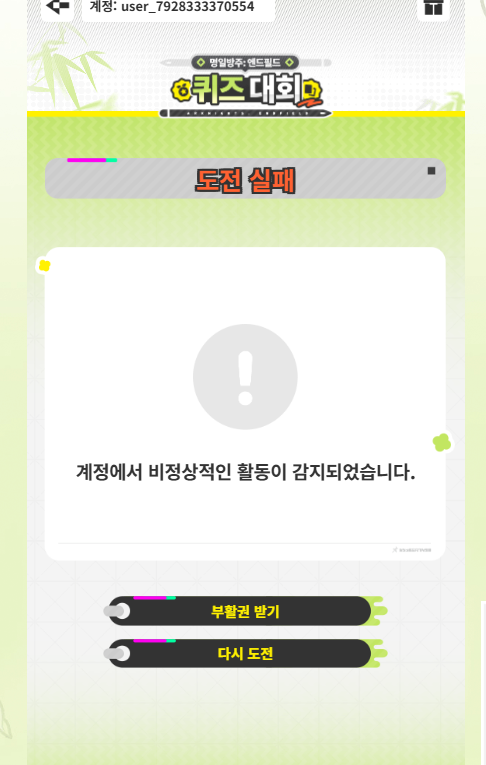
이거외에도 200초 이상 딜레이 걸리는것과
비정상적인 네트워크 감지도 있습니다.
top10 같은 이상한 조건으로 걸지마세요
그러면 이상한애들이 이렇게 합니다.
류웨이처럼 말도안되는 조건으로 하는걸 적극 권장 피드백합니다.
원본: 네이버 블로그
댓글
댓글 쓰기